If you’re exploring tftcomps, you’re likely seeking versatile, easy-to-integrate displays for your electronics projects. The Hosyond 2.4 Inches TFT LCD Touch Screen stands out as the best overall because of its reliable performance and touch capabilities, while the HiLetgo 2.8″ SPI TFT LCD offers a great balance of quality and affordability. Larger displays like the 7 Inch TFT LCD Monitor excel for more complex applications like video or rearview systems but come with added bulk and cost. The main challenge lies in balancing size, resolution, and compatibility—more features often mean higher prices or increased complexity. Keep reading to see how each option stacks up for your specific needs.

Get kitchen staples and gadgets delivered free with Prime
- Fast, free delivery on millions of items
- Prime Video, Amazon Music and more included
- Member-only deals all year
Key Takeaways
- Top picks are distinguished by their display size, resolution, and touch support, aligning with different project requirements.
- Compatibility with popular microcontrollers like Arduino and STM32 is a key factor, influencing ease of integration.
- Higher resolution and IPS panels tend to increase cost but offer better visual quality, important for detailed interfaces.
- Size and form factor vary widely, so selecting the right display depends heavily on your available space and project scale.
- Tradeoffs include balancing price, complexity, and feature set—more advanced displays generally require more setup and investment.




| tftcomp | Resolution | Display Size | Interface |
|---|---|---|---|
| Hosyond 2.4 Inches TFT LCD Tou | 320×240 | 2.4 inches | SPI Serial |
| HiLetgo 2.8" SPI TFT LCD Displ | 240×320 | 2.8 inches | — |
| 3 Pcs 1.28 Inch TFT LCD Displa | 240×240 | 1.28 inches | SPI |
| 2pcs 0.96" HD IPS TFT LCD Disp | 80 x 160 | — | SPI |
| 1.69 Inch Color TFT Display Mo | 240×280 | — | SPI |
| 3pcs 1.8 Inch Serial SPI TFT L | 128×160 | — | — |
| ELEGOO 2.8-Inch TFT Touch Scre | 320 × 240 | 2.8 inches | 8-bit parallel |
| 1.8 Inch TFT LCD Screen Displa | 128×160 | 1.8 inches | SPI |
| 7 Inch LED Backlight TFT LCD M | — | — | — |
| 2pcs 1.8" SPI TFT LCD Display | 128×160 | 1.8 inches | — |
| 3.5" TFT LCD Display ILI9486/I | 480×320 | 3.5 inches | — |
| ST7789 1.14 Inch TFT LCD Displ | — | 1.14 inch | — |
| Lonely Binary 6-Pack SPI TFT L | — | — | SPI |
More Details on Our Top Picks
Hosyond 2.4 Inches TFT LCD Touch Screen Shield Display Module 320×240 SPI Serial ILI9341 Compatible with Arduino R3/Mega2560
This 2.4-inch TFT LCD from Hosyond stands out for its vibrant color display and touch capabilities, making it ideal for simple interactive projects. Compared with the 2.8″ SPI TFT, it offers a smaller footprint but maintains high resolution, though it requires a bit more setup effort due to its touch interface and SD card socket. The inclusion of a touch pen enhances usability, especially for touchscreen menus or controls. However, the 2.4-inch size limits detailed graphics and may feel cramped for complex interfaces. It’s perfect for hobbyists seeking an affordable, colorful display that’s compatible with Arduino R3 and Mega2560, but those needing larger screens or plug-and-play simplicity might find it less ideal.
Pros:- Bright, colorful display with high resolution for its size
- Supports touch input via included pen, enhancing interactivity
- Compatible with popular Arduino boards and easy to integrate
Cons:- Requires some technical knowledge to configure and calibrate
- Limited to 2.4-inch size, restricting display space for detailed visuals
Best for: Beginners or hobbyists looking for a colorful, touch-enabled display for Arduino projects with limited space.
Not ideal for: Developers requiring large, high-resolution screens for complex graphics or commercial applications, due to its small size and setup complexity.
- Display Size:2.4 inches
- Resolution:320×240
- Interface:SPI Serial
- Driver IC:ILI9341
- Features:Touch screen, SD card socket
Our verdict“Ideal for Arduino beginners wanting a colorful, touch-enabled display without large size or complex setup.”
HiLetgo 2.8″ SPI TFT LCD Display Touch Panel 240×320 with PCB for STM32
The HiLetgo 2.8-inch display excels in embedded applications thanks to its integrated PCB featuring a power supply IC and SD card slot, making it a convenient choice for projects needing compact yet functional displays. Compared to the Hosyond 2.4-inch model, it offers a slightly larger screen but at a lower resolution, which means less detailed visuals. Its compatibility with STM32 microcontrollers broadens its applicability, although it requires a compatible controller and does not come with detailed instructions. This display is better suited for those comfortable with microcontroller integrations and seeking a ready-made PCB solution, rather than beginners needing plug-and-play simplicity.
Pros:- Includes PCB with integrated power supply and SD card slot
- Larger 2.8-inch size for better viewing area
- Touch panel functionality adds interactivity
Cons:- Requires a compatible microcontroller and some wiring knowledge
- Lower resolution may limit detailed graphics
Best for: Embedded system developers needing a compact, integrated display with power and storage features, especially for STM32 projects.
Not ideal for: Beginners or hobbyists seeking an easy-to-use, standalone display with minimal setup, due to the need for microcontroller compatibility and limited instructions.
- Display Size:2.8 inches
- Resolution:240×320
- Driver Element:a-Si TFT active matrix
- Viewing Direction:6 o’clock
- Includes:PCB with power supply IC and SD card slot
Our verdict“Best suited for embedded projects where integrated power and storage are priorities, and users are comfortable with microcontroller wiring.”
3 Pcs 1.28 Inch TFT LCD Display Screen Round 240×240 SPI
This set of three 1.28-inch round TFT displays offers a colorful, full-view angle experience thanks to IPS technology, making them perfect for wearable or compact gadgets. Compared to the larger 2.4″ or 2.8″ options, these are much smaller but excel in visual clarity and viewing angles, especially for projects where space is limited. They operate on 3-5V and use SPI, which is compatible with many microcontrollers, but the small size constrains their use for detailed graphics or complex interfaces. These modules are ideal for projects requiring multiple small displays, like smart watches or sensor panels, though their limited resolution and power needs may restrict use in more demanding settings.
Pros:- Full-color RGB display with vibrant visuals
- IPS panel offers wide viewing angles from multiple directions
- Compact round design suits wearable or small form-factor devices
Cons:- Requires 3-5V power supply, may need additional circuitry
- Limited resolution restricts complex graphical content
Best for: Enthusiasts designing small, multi-display projects such as wearables, badge displays, or compact control panels.
Not ideal for: Projects needing larger, high-resolution displays for detailed visuals or extensive user interfaces, as these are primarily small and simple.
- Display Size:1.28 inches
- Resolution:240×240
- Color:Full Color RGB
- Dimensions:37.5*45*3.2mm
- Interface:SPI
- Driver Chip:GC9A01
Our verdict“Perfect for small, multi-display setups where color and viewing angle are priorities, not detailed graphics.”
2pcs 0.96″ HD IPS TFT LCD Display Module 80×160 RGB Screen for Arduino
The 0.96-inch IPS TFT modules from ELEGOO excel in delivering vivid full-color visuals in a tiny package, making them ideal for small-scale projects like wearables or status indicators. Compared to larger screens like the 1.69-inch model, these are more limited in resolution but benefit from a straightforward SPI interface and low power consumption. The need to perform a reset after power-on can be a minor inconvenience, and their operating temperature range is somewhat limited for outdoor or rugged environments. These modules are best suited for projects prioritizing size and color vibrancy over detailed graphics, especially for users who want an easy, reliable display for Arduino or similar microcontrollers.
Pros:- Vivid, full-color display with good resolution for its size
- Compact and lightweight, ideal for small projects
- Easy to connect via SPI with minimal pins
Cons:- Requires reset after power-up, adding a step to startup
- Limited operating temperature range for outdoor or industrial environments
Best for: DIY enthusiasts creating small, colorful displays for wearable tech, badges, or compact control panels needing quick setup.
Not ideal for: Projects requiring high resolution or outdoor use in extreme temperatures, due to small size and temperature constraints.
- Size:0.96 inch
- Resolution:80 x 160
- Display Color:65K Full Color
- Drive Voltage:3.3V
- Interface:SPI
- Control Chip:ST7735
Our verdict“Excellent for small, colorful displays in wearable or badge projects where size and ease of use matter most.”
1.69 Inch Color TFT Display Module HD IPS LCD LED Screen 240×280 SPI Interface ST7789 Controller for Arduino
The 1.69-inch IPS TFT from B0DQ4R95TZ offers a sharp, vivid display with a wide 178° viewing angle, making it a strong choice for small devices where visual clarity from multiple directions is essential. Compared with the 0.96-inch modules, it provides a higher resolution and better color fidelity, though it still remains compact for portable projects. Its SPI interface keeps wiring simple, but some setup knowledge is needed to optimize its display modes. The slightly larger size makes it suitable for small dashboards, smart gadgets, or enhanced wearable displays where color quality and viewing angles are priorities, despite its limited application scope for larger or more detailed visuals.
Pros:- High-resolution IPS display with vivid colors
- Wide 178° viewing angle ensures clarity from multiple directions
- Low IO usage makes it easy to integrate with microcontrollers
Cons:- Requires some technical setup, not plug-and-play
- Limited to small display applications with lower pixel count
Best for: Developers designing small, high-quality displays for wearables or portable gadgets that benefit from wide viewing angles and vibrant visuals.
Not ideal for: Large-screen projects or complex UI applications, since its small size and resolution limit detailed content.
- Screen Size:1.69 inches
- Resolution:240×280
- Display Type:IPS LCD
- Interface:SPI
- Controller:ST7789
Our verdict“Perfect for small, portable devices where display quality and viewing angles are critical, and some setup complexity is acceptable.”
3pcs 1.8 Inch Serial SPI TFT LCD Screen Display Module PCB Adapter IC 128×160 Dot Matrix 3.3V 5V IO Interface Compatible with LCD1602
This set of three 1.8-inch TFT LCD modules offers a budget-friendly way to add multiple full-color displays to a project. Compared to the single 1.8-inch module, the trio provides more flexibility for multi-screen setups or complex interfaces. They connect via SPI, requiring only 4 IO pins, making integration straightforward for those familiar with microcontrollers. However, the absence of a backlight means visibility can suffer in low-light conditions, and the limited viewing angles restrict usability in some applications. These modules are ideal for DIYers who need multiple displays at a low cost and are comfortable with some technical setup, but they may not suit projects requiring high visibility or wide viewing angles.
Pros:- Cost-effective for multiple units, boosting project scalability
- SPI interface simplifies wiring with only 4 IO pins needed
- Supports both 3.3V and 5V power supplies for versatility
- Full-color display enhances visual appeal
Cons:- No backlight reduces visibility in dim lighting
- Limited viewing angles can hinder usability
- Requires some technical knowledge for proper setup
Best for: Hobbyists building multi-screen prototypes or displays on a tight budget who have some technical experience.
Not ideal for: Users seeking bright, high-visibility displays in low-light environments or beginners unfamiliar with SPI setup.
- Size:1.8 inches
- Resolution:128×160
- Communication:SPI
- Power Supply:3.3V/5V
- Controller Chip:ST7735
- Quantity:3 pieces
Our verdict“This set is well-suited for experienced DIYers needing multiple displays on a budget, but visibility in low light is limited.”
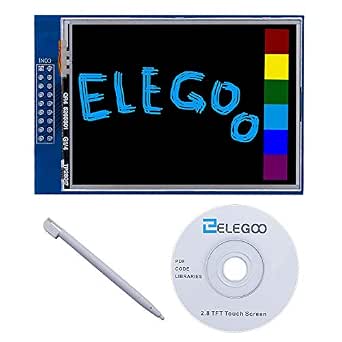
ELEGOO 2.8-Inch TFT Touch Screen with SD Card Slot for Arduino
The ELEGOO 2.8-inch TFT touch screen stands out for adding a graphical, interactive interface to Arduino projects, especially with the integrated SD card slot for expanded storage. Its resistive touch, paired with a stylus, makes navigation accessible, but it’s less responsive compared to capacitive screens, which may frustrate users seeking a smoother experience. The size makes it suitable for compact projects, yet the need for additional components and wiring can complicate setup compared to simpler displays like the 1.8-inch modules. This pick makes the most sense for those who want a touch-enabled interface with local storage, though it isn’t ideal for applications requiring high responsiveness or minimal complexity.
Pros:- Large, clear color display enhances user interaction
- Resistive touchscreen supports stylus input for precision
- MicroSD slot enables local data storage for multimedia or logs
- Easy to connect via UNO headers simplifies prototyping
Cons:- Resistive touch less responsive than capacitive alternatives
- Requires some additional components for full functionality
- Limited to Arduino compatibility, restricting broader use
Best for: Arduino enthusiasts developing interactive interfaces that benefit from on-device storage and touchscreen control.
Not ideal for: Users who prefer simple displays or need a highly responsive touchscreen without added complexity.
- Display Size:2.8 inches
- Resolution:320 × 240
- Touch Input:Resistive with stylus
- MicroSD Slot:Yes
- Interface:8-bit parallel
- Compatibility:Arduino
Our verdict“This screen is ideal for Arduino projects requiring touch control and local storage, but less suited for high-speed or highly responsive applications.”
1.8 Inch TFT LCD Screen Display Module for Arduino, 128×160 ST7735 3.3V SPI Interface 8-Pin RGB Color Panel
This 1.8-inch TFT LCD module excels with vivid, high-resolution full-color visuals in a tiny footprint, making it perfect for projects with space constraints. Its SPI interface ensures easy integration with Arduino and similar controllers, and the wide viewing angles boost usability across different orientations. Compared to larger screens like the 7-inch monitor, this display offers a more portable solution, though its small size limits applications that require larger visuals or detailed graphics. Operating at 3.3V, it’s efficient but demands familiarity with SPI communication. This pick makes the most sense for space-conscious projects where vivid visuals and reliable operation are priorities.
Pros:- Bright, full-color visuals with high resolution
- Compact size ideal for small devices
- Wide viewing angles improve versatility
- Easy SPI connection simplifies wiring
Cons:- Limited to 3.3V operation, restricting power options
- Small display size may not suit all applications
- No backlight reduces visibility in low light
Best for: Arduino developers needing a small, vibrant display for wearable or embedded projects.
Not ideal for: Projects that require large visuals or easy-to-see displays in dim environments, due to its small size and no backlight.
- Display Size:1.8 inches
- Resolution:128×160
- Interface:SPI
- Operating Voltage:3.3V
- Current:30mA
- Dimensions:35.00x56x3.45mm
Our verdict“This display is best for space-constrained designs that need high-quality visuals, but its small size limits broader display needs.”
7 Inch LED Backlight TFT LCD Monitor for Car Rearview Cameras and Video Equipment
This 7-inch monitor is designed explicitly for automotive and video use, with adjustable brightness, contrast, and color, making it ideal for rearview cameras or surveillance setups. Its rotatable screen offers flexible viewing angles, and the dual AV inputs support multiple devices such as DVD players and backup cameras. However, installation can be complex, often requiring professional help, and the lack of audio input limits its use for multimedia applications that rely on sound. Unlike small embedded displays, this monitor prioritizes larger visuals and versatility in video connectivity, making it suitable for mobile or fixed setups that demand clear, adjustable visuals but not for simple microcontroller projects.
Pros:- Supports multiple video inputs for flexible device connection
- Adjustable brightness, contrast, and color enhance visibility
- Rotatable screen allows for customized viewing angles
- Large 7-inch size provides clear visuals
Cons:- Installation may need professional assistance
- No audio input/output limits multimedia capabilities
- Designed primarily for video, not microcontroller projects
Best for: Car owners or security installers needing a versatile, adjustable display for video feeds or backup cameras.
Not ideal for: DIY electronics projects that require small, low-power displays or audio integration.
- Screen Size:7 inches
- Display Type:Color TFT LCD
- Backlight:LED
- Aspect Ratio:16:9/4:3 adjustable
- Inputs:2 AV
- Included Accessories:Holder, Frame, Video & Power Cable, Remote
Our verdict“Ideal for automotive or security applications where large, adjustable video display outweighs the need for microcontroller compatibility.”
2pcs 1.8″ SPI TFT LCD Display Module 128×160 RGB Screen for Arduino
This bundle of two 1.8-inch TFT LCD modules offers a compact, colorful display option for Arduino projects, with each module featuring the well-known ST7735 controller. Their 128×160 resolution provides decent visuals, and the built-in 8-pin port makes wiring straightforward. While perfect for adding multiple small displays, the lack of backlight means users must add external lighting in darker settings, and their operation at 3.3V can be limiting for some power setups. Compared to larger displays, these modules shine in space-saving applications but are less suitable where bigger, more visible screens are needed. This choice suits projects where size and color quality matter most, rather than high visibility or ease of lighting.
Pros:- Two modules provide flexibility for multi-display setups
- Full color visuals with decent resolution
- Easy to connect via built-in 8-pin port
- Compact size ideal for small devices
Cons:- No backlight, limiting visibility in dark conditions
- Requires 3.3V power supply, restricting some setups
- Requires technical knowledge for integration
Best for: Arduino hobbyists working on small, portable projects that require multiple colorful displays.
Not ideal for: Projects needing large, easily visible screens or environments with poor lighting, due to no backlight.
- Display Size:1.8 inches
- Resolution:128×160
- Color:Full color
- Controller:ST7735
- Voltage:3.3V
- Units:2
Our verdict“This pair is perfect for space-efficient projects that need colorful visuals, but poor lighting conditions can hinder usability.”
3.5″ TFT LCD Display ILI9486/ILI9488 for Arduino Mega2560
This 3.5-inch TFT display stands out for its compatibility with Arduino Mega2560, offering a sizable 480×320 resolution that makes it ideal for projects requiring detailed visuals. Unlike smaller screens like the 1.14-inch ST7789, this model provides a more comfortable viewing area, especially for complex interfaces. Its support for both 5V and 3.3V operation, along with onboard level conversion, simplifies integration into standard Arduino setups. However, its non-touch nature limits interactivity, making it less suitable for projects demanding touch control. Setup can be somewhat technical, requiring familiarity with wiring and configuration, which might challenge beginners. This display makes the most sense for hobbyists or engineers who need a larger, straightforward display for sensor dashboards or control panels without touch functionality.
Pros:- Large 3.5-inch display with high resolution (480×320) for detailed visuals
- Supports both 5V and 3.3V power supplies, easing integration
- Includes onboard level conversion chip for compatibility
Cons:- No touch screen functionality, limiting interactivity
- Requires technical knowledge for setup and wiring
Best for: Arduino enthusiasts building dashboards or control interfaces that prioritize size over touch interaction.
Not ideal for: Beginners seeking plug-and-play solutions or projects requiring touch input, as it lacks touch capabilities and involves some wiring complexity.
- Display Size:3.5 inches
- Resolution:480×320
- Compatibility:Arduino Mega2560
- Pins:36
- Support:5V/3.3V operation
- Touch Screen:No
Our verdict“This display suits experienced Arduino users needing a sizable, straightforward visual interface, but it’s less ideal for touch-based projects.”
ST7789 1.14 Inch TFT LCD Display Module for Electronics Enthusiasts
The ST7789 1.14-inch display offers a compact yet clear visual, making it ideal for projects where space is limited, such as wearables or compact gadgets. Compared with larger displays like the 3.5″ model, it sacrifices screen real estate but excels in portability and ease of mounting. Its durable electronic components promise long-lasting performance, which appeals to electronics hobbyists seeking reliability. While it boasts excellent visibility for its size, limited details on resolution or power requirements mean potential buyers might need to do additional research for specific performance expectations. Its small form factor and ease of installation make it a perfect choice for quick prototyping or embedded displays in tight spaces, but it’s less suitable for projects demanding high resolution or touch features.
Pros:- Clear visibility on a tiny 1.14-inch screen
- Durable electronic components ensure long-term reliability
- Easy to install with quality workmanship
Cons:- Limited information on resolution and power needs
- Small size restricts its use for detailed interfaces
Best for: Electronics hobbyists designing compact devices or wearables needing a small, durable display.
Not ideal for: Prototypers requiring larger or high-resolution screens, or touch-enabled functionality for interactive projects.
- Display Size:1.14 inch
- Type:TFT LCD
- Model:ST7789
Our verdict“This display is perfect for small, durable, low-profile projects but isn’t designed for high-res or touch-based applications.”
Lonely Binary 6-Pack SPI TFT LCD Display Kit 0.96″-3.5″ for 3.3V MCUs
This kit offers a broad range of display sizes from 0.96″ up to 3.5″, making it ideal for versatile prototyping across various projects. Unlike the single-sized options like the 1.14-inch ST7789 or the 3.5″ display for Arduino, this set provides flexibility to test different form factors quickly. The plug-and-play FPC connectors simplify initial setup, especially for those working with microcontrollers like ESP32 or Raspberry Pi Pico, which operate at 3.3V. However, some displays will require logic level converters if used with 5V microcontrollers, adding complexity. Additionally, certain models may need extra wiring or soldering for breadboard use, which could be a barrier for beginners. Overall, this kit offers extensive versatility but demands some technical comfort with wiring and level shifting.
Pros:- Six different sizes for extensive prototyping options
- Plug-and-play connectors simplify initial setup
- Compatible with popular 3.3V microcontrollers like ESP32 and Raspberry Pi Pico
- Includes detailed tutorials and supported drivers
Cons:- Requires logic level converters for 5V microcontrollers
- Some displays need extra wiring or soldering for breadboard use
Best for: Prototypers and developers testing multiple display sizes in a single project or product line.
Not ideal for: Beginners or those seeking a simple, ready-to-use display solution without additional wiring or configuration.
- Display Sizes:0.96″, 1.8″, 2.0″, 2.4″, 2.8″, 3.5″
- Interface:SPI
- Voltage:3.3V
- Connectors:FPC, jumper headers
- Driver ICs:ST7735S, ST7789, ST7796
Our verdict“This kit is best for experienced developers needing multiple display sizes for flexible prototyping, despite added wiring complexity.”

How We Picked
The products were evaluated based on several criteria important to electronics enthusiasts and developers. Performance includes display clarity, responsiveness, and reliability. Usability factors in ease of wiring, compatibility, and touch functionality. Build quality and durability were considered, especially for prolonged projects. Value was assessed by balancing features against cost, ensuring options cater to both budget-conscious buyers and those seeking premium quality. The ranking reflects a combination of these factors, prioritizing displays that offer the best overall experience for a variety of project types and skill levels.Factors to Consider When Choosing Tftcomps
Choosing the right TFTComps involves understanding your project requirements and balancing several key factors. Size impacts visibility and space constraints, while resolution affects clarity and detail. Compatibility with your microcontroller or development environment can make setup smoother and reduce troubleshooting. Touch support can add interactivity but may increase complexity and cost. Considering power requirements and form factor ensures your display integrates well with your overall design. Being aware of these factors helps avoid common pitfalls like overspending on unnecessary features or selecting incompatible hardware.Display Size and Resolution
Size directly influences how much information can be displayed at once and how much space the display will occupy in your project. Smaller screens, such as 0.96 or 1.8 inches, are ideal for compact devices but may limit usability for detailed visuals. Larger screens, like 3.5 or 7 inches, offer more real estate but increase weight and power consumption. Resolution impacts image clarity; higher resolutions like 320×240 or 240×320 provide sharper visuals, especially important for complex interfaces or detailed graphics. Matching size and resolution to your project’s needs ensures optimal user experience without unnecessary expense.
Compatibility and Connectivity
Most TFTComps connect via SPI or similar interfaces, making compatibility with microcontrollers like Arduino or STM32 crucial. An incompatible display can lead to setup headaches and limited functionality. Check whether the display supports your preferred voltage levels (3.3V or 5V) to prevent damage or performance issues. Some displays include built-in controllers like ST7789 or ILI9341, simplifying integration, while others may require additional driver libraries or coding effort. Ensuring compatibility upfront saves time and enhances your project’s stability.
Touch Functionality
Touch support adds interactivity but often comes with increased complexity and cost. Resistive touch screens are generally more affordable and straightforward, suitable for basic applications. Capacitive touch screens, however, are more responsive and support gestures, making them better for user-friendly interfaces. Consider whether your project demands touch input or if a simple display suffices. Over-investing in touch features for simple displays can inflate costs without significant benefit, so match the feature to your actual user interaction needs.
Build Quality and Durability
For projects that will be exposed to outdoor elements or frequent handling, a durable, well-constructed display is essential. Look for displays with robust glass or protective coatings to prevent scratches and damage. For indoor, stationary projects, slightly lower durability can be acceptable, allowing for savings. Also, verify the quality of the connectors and mounting options, as these influence longevity and ease of installation. Investing in a solid build reduces maintenance and replacement costs over time.
Price and Value
While budget options can be tempting, they often sacrifice resolution, durability, or ease of use. Balancing cost against features like touch support, resolution, and size ensures you get the best value for your needs. Premium displays tend to offer better color accuracy, IPS panels, and longer lifespans, justifying higher prices for demanding applications. Conversely, cheaper models are suitable for prototyping or simple projects. Avoid overpaying for features you won’t utilize, but also be cautious of extremely low-cost displays that might lack reliability or compatibility.
Frequently Asked Questions
Can I use these TFTComps with a Raspberry Pi?
Most of these TFTComps are designed for microcontrollers like Arduino or STM32, and some may support Raspberry Pi via SPI or HDMI interfaces if compatible. Always verify the display’s interface and voltage requirements, as Raspberry Pi’s GPIO pins operate at 3.3V. Many displays require additional adapters or driver libraries to work seamlessly with a Raspberry Pi. If you plan to switch platforms, check for specific compatibility notes and community support to ensure smooth integration.
Are touch-enabled TFT displays suitable for outdoor use?
Touch-enabled displays can be used outdoors, but their durability depends on the build quality and protective coatings. Look for models with reinforced glass and weatherproofing features if your project will be exposed to elements like rain, dust, or sunlight. IPS panels tend to have better visibility in sunlight, which is crucial for outdoor environments. Keep in mind that touch screens may need calibration and protection against environmental stressors to maintain responsiveness and longevity.
What is the typical power consumption of these displays?
Power consumption varies widely depending on size, resolution, and backlight type. Smaller displays with low resolution often draw less than 100mA, making them suitable for battery-powered projects. Larger or high-resolution displays can consume several hundred milliamps, requiring careful power management. Consider your power supply capacity and whether your project benefits from features like automatic backlight dimming. Choosing energy-efficient displays helps extend battery life and reduce heat generation.
How complicated is it to add touch support to a non-touch TFT display?
Adding touch functionality to a standard TFT display typically involves integrating a resistive or capacitive touch overlay and compatible driver hardware. Many displays come with built-in touch panels, simplifying the process, but if not, you might need additional components and extensive calibration. Programming support varies; some platforms offer libraries that make integration easier, while others may require custom coding. For beginners, starting with a display that already includes touch support reduces setup time and complexity.
Is it better to buy a larger or smaller TFT display for my project?
The choice depends on your project’s purpose. Larger displays are ideal for detailed interfaces, video playback, or data visualization but can increase power consumption and size. Smaller displays are more suitable for compact or portable projects, providing sufficient information without adding bulk. Consider the space available, user interaction needs, and your budget. Larger displays often require more advanced controllers and wiring, so matching size to your actual requirements avoids unnecessary complication.
Conclusion
For those seeking a robust, all-around display, the Hosyond 2.4 Inches TFT LCD Touch Screen offers excellent value and feature set. If budget is your main concern, the Lonely Binary 6-Pack SPI TFT LCD Display Kit provides multiple options at a low cost. Beginners will appreciate the simplicity of smaller, pre-wired modules like the 1.8 Inch TFT LCD Screen. For projects demanding larger, high-resolution visuals, the 7 Inch LED Backlight TFT LCD Monitor makes sense despite higher complexity and price. Overall, your ideal choice hinges on balancing size, complexity, and application needs—match your project goals with the right display to get the best results.